
PickTalk — Chat & Trip Settings
Last updated 2026-08-06
Auto-translated chat
A 1:1 PickTalk chat room opens automatically for every booking.
- Travelers write in Korean — you read it in English. Your English replies reach them in Korean.
- Tap a translated bubble to see the original text. Long-press for copy and translate options.
- The toggle in the app bar turns auto-translation on or off (on by default).
- Check marks on your messages: ✓ sent, ✓✓ (blue) read by the traveler.
Push notifications for new messages arrive in English even when the app is closed.
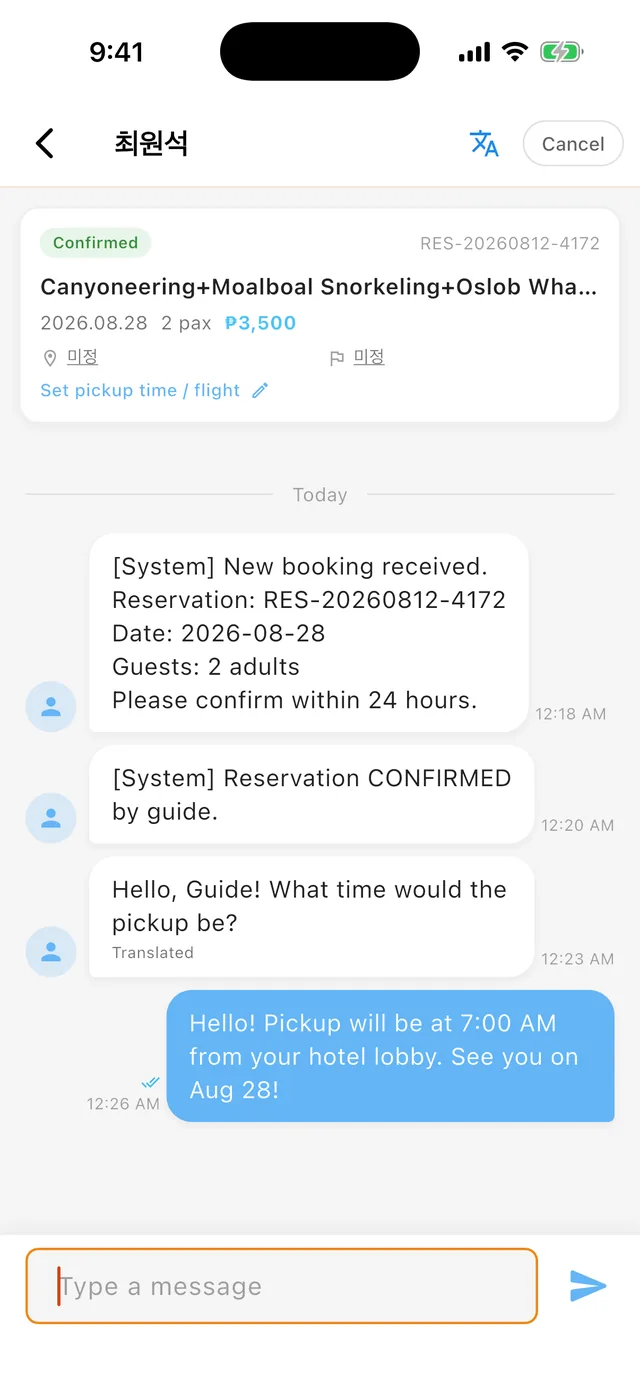 PickTalk — the traveler's Korean message shown in English with a Translated label, plus read receipts
Trip settings you can edit directly
As the guide, you can update these directly from the chat room's edit menu — no approval needed, the traveler is notified automatically:
- Pickup location / drop-off location
- Pickup time
- Flight number
Use this to finalize the meeting plan after checking the traveler's hotel and arrival details.
Traveler change requests
Travelers can request changes to pickup/drop-off locations and flight number. You'll see an [Approve Change] button in the chat room — review and approve or decline with a reason.
Date and party-size changes are not supported; the traveler cancels and rebooks instead (refunds follow the cancellation policy).