
Registering Tour Products
Last updated 2026-08-06
Create a product
Go to My Page → Product Management → Add Product.
- Pick tour categories in your region. Choose one category for a single tour, or two or more to create a package tour (e.g., Oslob + Moalboal).
- Build the course step by step — the first step is the pickup, the last step is the drop-off.
- Add details — what's included, optional add-ons with prices.
- Set prices in PHP — your listed price is what you receive on-site.
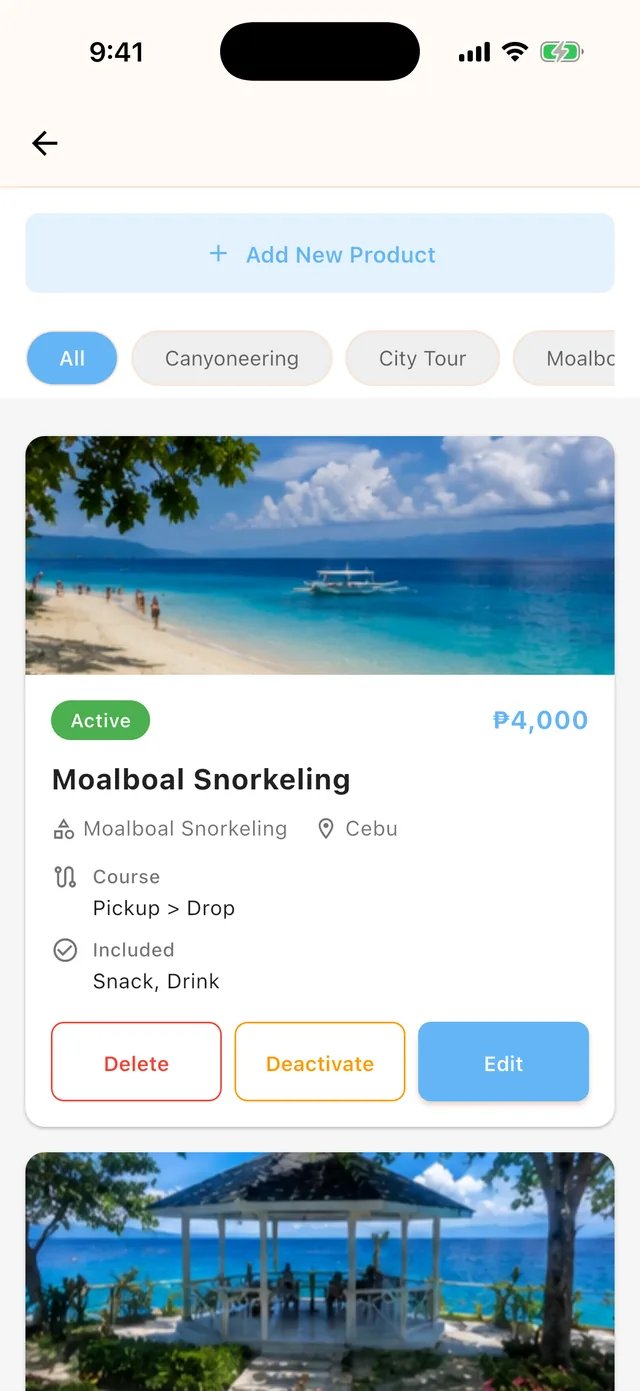 Product Management — your tours with status, price, and quick actions
Pricing (private tours)
Prices use fixed totals per group size. For each tier, enter the maximum number of guests and the total price for that group — for example: up to 2 guests ₱4,000 / up to 4 guests ₱6,000. A party of 3 pays the "up to 4" tier.
Travelers see your price converted to Korean won with the platform fee included. The PHP amount you enter is fully yours, paid in cash on tour day. The deposit paid in the app is the platform's service fee.
Review & approval
- New products start as Draft and go live only after our team approves them.
- Editing a live product doesn't take it off sale. Your edits are saved as a pending version; the current version keeps selling until the new one is approved, and bookings received meanwhile follow the existing conditions.
- You can deactivate a product yourself at any time to stop selling.
Management label
Add a private management label (nickname) to each product — it's only visible to you and makes products easier to identify in Schedule Management. Changing it never triggers re-review.